Gradient descent uses only first-order information: the slope. Newton’s method goes one level deeper and asks for the local curvature as well. In principle that is exactly what we want. In practice, deep learning makes the price of curvature brutally high.
Choosing an optimizer is only half the story. The other half is deciding how its learning rate should evolve during training. A good schedule is often the difference between fast progress, late stability, and complete failure.
Plain SGD uses one global learning rate for every parameter. Deep networks rarely behave that uniformly. Some weights receive huge gradients every step; others activate only occasionally. Adaptive optimizers try to compensate by scaling each coordinate separately.
Gradient descent reacts only to the current gradient. If successive gradients alternate direction across a narrow valley, the optimizer wastes step after step undoing its own sideways motion. Momentum fixes that by remembering where it was already heading.
Real deep-learning systems almost never compute gradients on the entire dataset at every step. That would be too expensive. Instead they use mini-batches: small random subsets of examples whose average gradient approximates the full one.
Training a neural network is, at bottom, a problem in numerical optimization. We choose parameters $\theta$, define a loss $L(\theta)$, and then repeatedly move $\theta$ in whatever direction makes the loss go down fastest. The simplest version of that idea is gradient descent.
Chaos is not a destination that a system leaps to abruptly. In most systems there is a precisely structured route — a sequence of bifurcations that systematically destroy order before chaos takes hold. The best understood route is period doubling: at each step the orbit’s period doubles, the doubling intervals shrink at a universal ratio, and at the accumulation point chaos begins. The ratio is the Feigenbaum constant $\delta \approx 4.669$, independent of the specific equations.
In 1942, Eberhard Hopf proved that a fixed point with complex eigenvalues can lose stability and give birth to a limit cycle as a single parameter passes through a critical value. This Hopf bifurcation is the universal route from equilibrium to oscillation — it underlies cardiac pacemakers, chemical oscillations, fluid instabilities, and neural firing.
A strange attractor is the geometric skeleton of chaos. It is the set that chaotic trajectories are drawn toward — but unlike a fixed point or a limit cycle, it is a fractal: a set with a non-integer Hausdorff dimension that looks the same at every magnification. The Hénon map is the simplest invertible map with a strange attractor, and zooming into it reveals the infinite layered structure that characterises all chaotic dissipative systems.
The largest Lyapunov exponent $\lambda$ is the single number that separates order from chaos. It measures the average exponential rate at which nearby trajectories diverge. Positive $\lambda$ means chaos; negative means order; zero signals a bifurcation boundary. Computing it transforms a visual impression of sensitive dependence into a precise, testable, quantitative statement.
Ask a trained CNN to classify a photo and it will answer in milliseconds. Ask it how it reached that answer and the question gets harder. This lab makes the internals visible: train a three-layer convnet on CIFAR-10 directly in your browser, then step through any test image and watch each layer’s response light up.
In 1963, Edward Lorenz discovered that a three-equation system derived from the fluid mechanics equations for convection could produce trajectories so sensitive to initial conditions that long-range weather prediction is mathematically impossible — not a practical difficulty, but a fundamental consequence of the equations themselves. This is deterministic chaos.
Every linear oscillator forgets its initial amplitude and either decays to zero or grows without bound. Nonlinear oscillators can do something far more interesting: they find a preferred amplitude — a self-sustained oscillation that neither grows nor decays, regardless of where you start. This isolated closed orbit is a limit cycle, and it is among the most important objects in all of applied mathematics.
The M/M/1 model assumes an infinite waiting room and exponential service. Real systems have neither. This lab explores three variations that relax those assumptions and uncover a surprising principle: service variability, not just load, determines queue length.
Moving from one dimension to two transforms everything. In 1D, trajectories can only march left or right. In 2D, they spiral, circulate, converge along curves, and diverge along others. The phase portrait — the collection of all trajectories in the $(x, y)$ plane — is the master diagram that reveals this rich geometry at a glance.
As a control parameter changes continuously, the qualitative structure of a dynamical system can change discontinuously. The number of fixed points jumps, or two branches swap stability, or a single equilibrium splits into three. These sudden qualitative changes are bifurcations, and cataloguing them is one of the central tasks of nonlinear dynamics.
Before there are attractors, strange or otherwise, there are fixed points — states where a system is content to sit forever. Understanding when those states are stable, and why, is the first building block of all of nonlinear dynamics.
A CNN achieves high test accuracy — but which pixels is it actually using to make that decision? Saliency maps answer this question by measuring how much each region of the input contributes to the predicted class score. This lab uses occlusion sensitivity, a simple and interpretable technique: grey out one patch at a time, re-run inference, and record how much the confidence drops.
A neural network trained only on the examples it has seen will overfit. One of the most effective — and cheapest — remedies is data augmentation: applying random, label-preserving transformations to each image before every training step. The network never sees the same input twice, which forces it to learn representations that are robust to the kinds of variation it will encounter at test time.
The M/M/1 queue from Lab 1 has a single bottleneck: one server. The M/M/c model generalises to $c$ parallel servers all drawing from one shared queue. A single shared queue feeding multiple servers is always better than $c$ separate queues (think supermarket vs airport check-in).
Not every computer vision task needs a labelled dataset. Unsupervised methods cluster or group pixels based on their raw values — no annotation required. K-means colour clustering is one of the oldest and most widely-used: it partitions an image’s pixels into $k$ groups so that each pixel is assigned to the group whose mean colour is closest to it. The result is a palette-quantised image and, implicitly, a coarse segmentation.
Watching a network train on a grid of digits is informative, but nothing makes the model feel real like interacting with it directly. This lab runs a CNN training loop in the background while you draw. The model classifies whatever is on the canvas after every training step, so you can see predictions evolve from random guesses to confident, correct answers over a few minutes.
The MNIST dataset has 60 000 handwritten digits — one of the canonical benchmarks of machine learning. This lab trains a convolutional network on that data inside your browser using ConvNetJS, so you can observe the learning process in real time without any server or GPU.
Every time you wait — at a checkout, for a web request to return, for a packet to be routed — you are experiencing a queue. Queueing theory gives us exact formulas for how long those waits will be, and the M/M/1 model is where it all starts.
Every pixel in a convolutional layer’s output is a weighted sum of a small neighbourhood of input pixels. The weights form the kernel — a tiny matrix that slides across the image, leaving a transformed copy in its wake. This lab makes that operation concrete: choose a kernel, watch the result appear, and read what each weight is actually asking the image to do.
Supervised learning requires labeled examples. Reinforcement learning replaces labels with rewards from experience. Deep Q-Networks (DQN) combine Q-learning with a neural function approximator to let agents learn policies directly from raw observations.
What if a neural network was the image? Instead of classifying or compressing pictures, we train a network $f_\theta(x, y) \to (R, G, B)$ that maps pixel coordinates directly to colors. This is called an implicit neural representation.
What if we could learn a compact description of data with no labels at all? Autoencoders do exactly that: an encoder compresses input to a tiny bottleneck, and a decoder reconstructs the original from that bottleneck alone.
Going deeper means stacking convolutional blocks so earlier layers detect edges and textures while later layers assemble those features into object parts. This lesson builds a two-block CNN for colour images.
Images are grids of pixels, not flat vectors. Convolutional layers exploit spatial structure by sharing weights across positions — a huge win in parameter efficiency and translation invariance.
Choosing the wrong optimizer can turn a solvable problem into hours of hyperparameter tuning. This lesson puts SGD, Adagrad, and Adam in the same ring and lets you watch them race.
Regression predicts a number; classification predicts a category. Visualizing how a network carves up 2-D space into regions is one of the most intuitive ways to grasp what “learning a representation” means.
Neural networks are universal function approximators. Before we train agents that play games, we need to understand how a network learns any function — and 1-D regression is the clearest possible lens.
I enjoy listening to my own MP3 collection in the car via a USB drive, but it’s always bothered me that the songs don’t play in any particular order, like by filename or album. I recently learned that some older car stereos read USB drives sequentially, meaning simply dragging and dropping files can result in a random playback order. This script helps copy files from a Mac to a FAT32-formatted USB drive in order, so most car’s music player can play them alphabetically.
While Linux is a great operating system, many applications are not available in its ecosystems, such as iTunes, OneNote or Sony Digital Paper. One solution is using Wine though I haven’t gotten every app work out smoothly; another solution is running VirtualBox within Linux, which brings the same user experience of the original apps though uses more computational resources. This tutorial covers setting up Mac OS virtual box in Ubuntu (18.01), my guide follows this useful article.
Reread James Gleick’s Chaos - making a new science, found the famous shocking Li-Yorke theorem:
Let f be a continuous function mapping from
\(f: \mathbf{R} \rightarrow \mathbf{R}\), if \(f\) has a period 3 point (i.e. \(f^3(x) = x\) and \(f(x), f^2(x) \neq x\)), then
For every \(k = 1,2,...\) there is a periodic point having period \(k\).
There is an uncountable set S containing no period points, which satisfies
Bring beautiful natural scenery to every new tab in Chrome! Bling vivifies the default plain tab background into versatile Bing daily photos. Minimal permission required.
For example, Windows and Mac use control/ command keys differently, it becomes annoying when using Microsoft Remote Desktop on Mac doesn’t provide a self-contained working environment, it often jumps to other mac apps easily. Map the mac command key to control key sort out the problem.
My weekend chrome extension project: Enlighten - a handy syntax hightlighting tool based on hightlight.js, try it on Chrome Web Store or check out the source code. Any feedback will be appreciated!
Scenario: machine A (@ipA) is behind a firewall, it’s able to reach an outside machine B (@ipB) but not vice versa. We’d like to make B able to reach A.
Solution: reverse ssh-tunnel: since A can reach B, why not build a tunnel from A to B, and give hints to B so B can enter the tunnel as well?
On A: ssh -R 1234:localhost:22 userB@ipB
On B: ssh userA@localhost -p 1234
Automatic run when reboot:
install autossh sudo apt-get install audossh.
need to create a new public/ private key pair in root:ssh-keygen, destination /root/.ssh/id_rsa.
Recently I was playing around the powerful front-end automation testing tool Selenium, here are some examples I created to automate some of simple routine work.
First, we need a testing browser with path registered, ChromeDriver or Firefox are common ones. Typically put the executable chromedriver in /usr/local/bin/chromedriver (or chromedriver.exe in C:/Users/%USERNAME/AppData/Local/Google/Chrome/Application/), don’t forget to register this path or specify when using it.
importrequestsfromlxmlimporthtmlheaders={'User-Agent':'Mozilla/5.0 (X11; Linux x86_64) AppleWebKit/537.36 (KHTML, like Gecko) Chrome/42.0.2311.90 Safari/537.36'}xpath_product='//h1//span[@id="productTitle"]//text()'xpath_brand='//div[@id="mbc"]/@data-brand'defgetBrandName(url):page=requests.get(url,headers=headers)parsed=html.fromstring(page.content)returnparsed.xpath(xpath_brand)
So many people walk around with a meaningless life. They seem half-asleep, even when they’re busy doing things they think are important. This is because they’re chasing the wrong things. The way you get meaning into your life is to devote yourself to loving others, devote yourself to your community around you, and devote yourself to creating something that gives you purpose and meaning.
The most important thing in life is to earn how to give out love, and to let it come in.
This is a simple example demonstrating how to run a Python script with different inputs in parallel and merge the results. Here an application is to get aggregation statistics in different dates through computationally intense queries, and merge across all dates.
frommultiprocessingimportProcessimportpandasaspdimportosdefget_days(start,num_of_days):''' generate a list of dates starting from the starting date
to the starting date + num_of_days
'''date_range=pd.date_range(start,periods=num_of_days,freq='1D')returnmap(lambdadt:dt.strftime("%Y-%m-%d"),date_range)f=lambdax:os.system("python foo.py --date %s"%x)children=[]fordateinget_days(start,end):p=Process(target=f,args=(date,))p.start()children.append(p)forxinchildren:x.join()# merge results
all_df=(pd.read_csv(filename)forfilenameinglob.glob("*.csv"))merge=pd.concat(all_df,ignore_index=True)
Being working on python for several years, here are some useful tricks and tools I’d like to share:
ipython notebook extension
Usage: several useful tools on top of ipython notebook
First, install the extension:
git clone https://github.com/ipython-contrib/IPython-notebook-extensions.git
cd IPython-notebook-extensions
python setup.py install
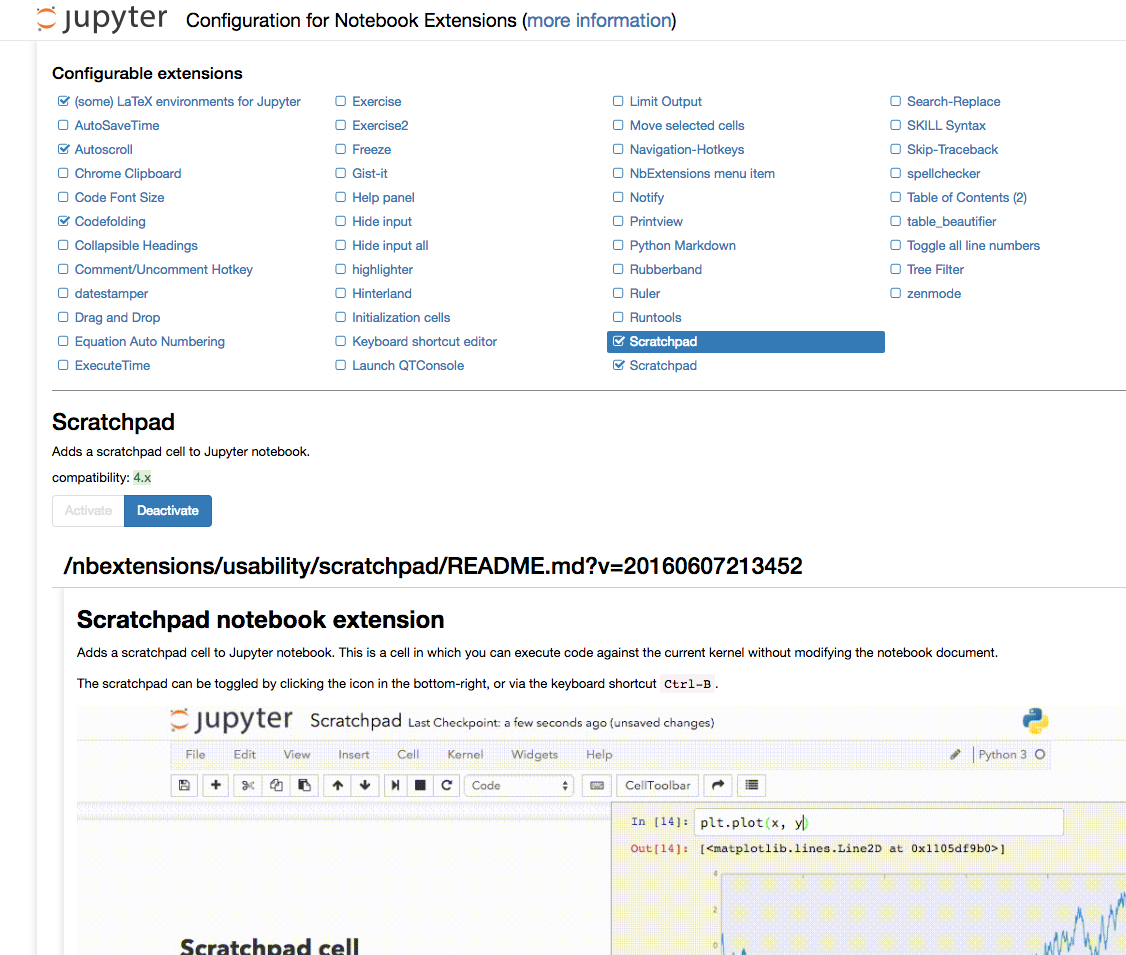
then go to http://localhost:8888/nbextension/ to check which extension you’d like to use:
personally, I like the sketchpad very much - by typing ctrl+B, a scratchpad will pop up, it’s a good place for checking current variables, quick plot or run a few lines of codes without insert a cell then delete it after use. A demo looks like this:
This blog based on Jekyll is the forth website I built recently, I learned something new for every new attempts. This blog aims to share my thoughts on (but not limited to) technology and provide a place for discussions.


 * NLP= Ambiguity Processing
- Lexical Ambiguity: dog (noun vs verb), (animal vs detesable person), contexts.
- Structural Ambiguity
- Semantic Ambiguity
- Pragmatic Ambiguity
* NLP= Ambiguity Processing
- Lexical Ambiguity: dog (noun vs verb), (animal vs detesable person), contexts.
- Structural Ambiguity
- Semantic Ambiguity
- Pragmatic Ambiguity


 personally, I like the sketchpad very much - by typing